Realtime Unified BioAcoustic Tool
Sounds and Senses Lab
Live audio-visual monitoring and high-fidelity multichannel recording
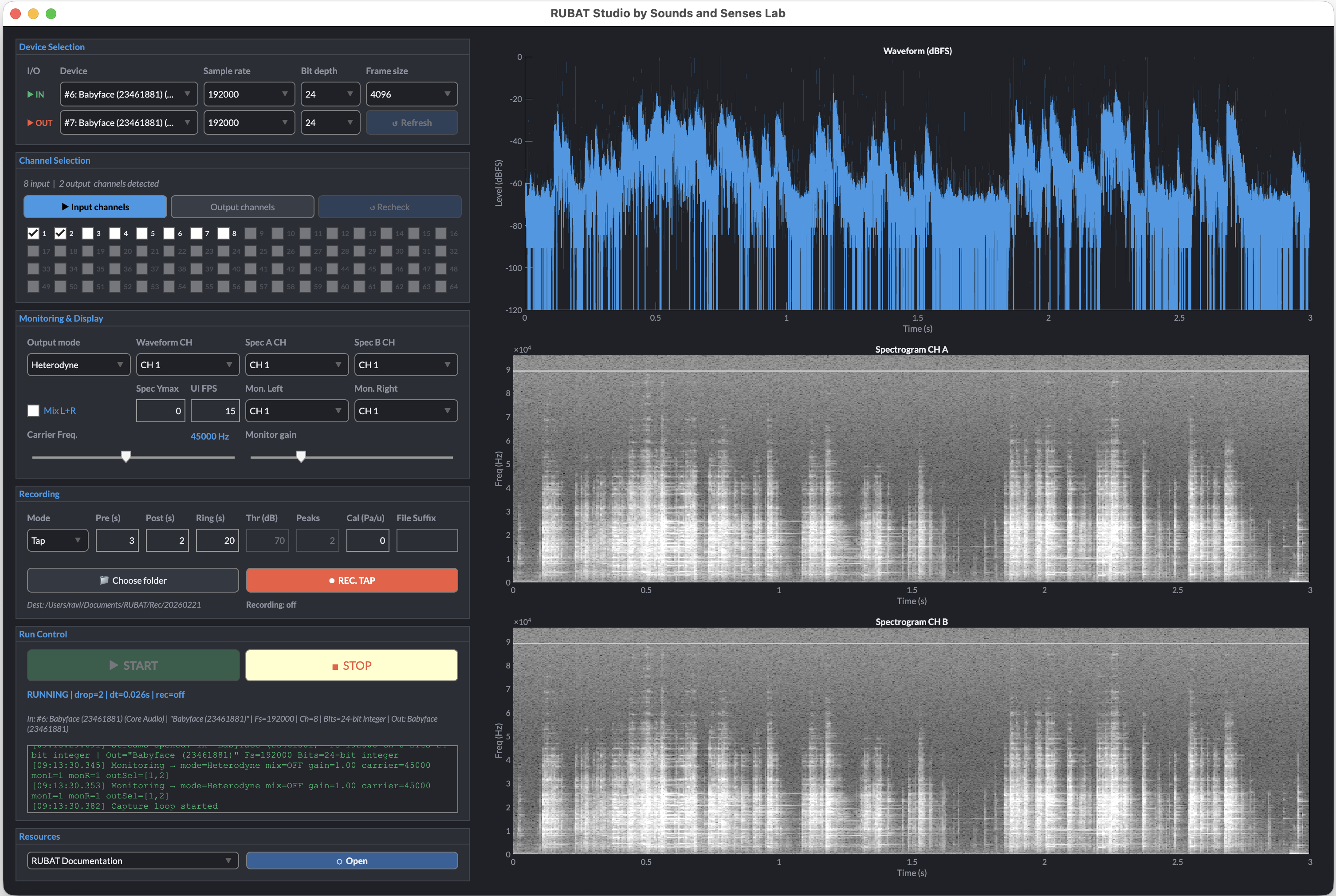
RUBAT Studio is a MATLAB-based recorder for field bioacoustics and multichannel acquisition. It pairs high-sample-rate capture with real-time heterodyne monitoring, responsive visualisation, and robust recording workflows that feel at home within the BiosoniX family.
- Flexible workflows
- Realtime monitoring
- Tap / Continuous / Auto
- Multichannel audio streams
- Record any sound
What is it good for?
RUBAT Studio was designed to address the practical challenges of ultrasonic field recording, but its architecture makes it equally suitable for general multichannel audio projects.
For bioacoustics and fieldwork, it enables you to:
- Monitor audio live while recording full-bandwidth data via heterodyne or passthrough modes.
- Handle many channels cleanly using selectable input/output channel masks.
- Capture what just happened with a ring buffer and tap recording.
- Trigger recordings automatically using threshold-based Auto mode.
- Reduce failures in the field through explicit device probing and predictable run controls.
Beyond ultrasonic work, RUBAT can also function as a robust multichannel recorder for music, voice, and studio-style sessions:
- Record multiple microphones or instruments simultaneously.
- Track vocals against a backing track on separate channels.
- Capture rehearsals, demos, or live sessions with ordered and tagged WAV files.
In short, RUBAT combines research-grade reliability with studio flexibility — whether you’re documenting insect/bat/bird calls, or recording a multitrack performance indoors.
How to pronounce “RUBAT”
Say it like “Rue-BAT”. “Rue” rhymes with “blue”, then “bat”.
Phonetic: ROO-bat · IPA: /ˈruː.bæt/
Key capabilities
Continuous monitoring
Shift bat calls into the audible range with continuously accumulated heterodyne phase, with no clicks or frame-boundary discontinuities. Switch freely between Off, Passthrough, and Heterodyne while the stream is live.
True N-channel routing
Each selected input channel can route one-to-one to matching physical outputs. A per-channel mask keeps monitoring predictable, while Mix mode gives intuitive left-right headphone monitoring of an array.
Ring buffer tap capture
A continuously written buffer keeps the last N seconds of audio ready at all times. Press TAP to recover what happened just before the moment you reacted.
Auto mode for unattended runs
Arm Auto and let lightweight threshold detection fire retrospective tap captures on its own, ideal for long deployments and low-overhead field use.
Calibrated waveform display
Provide a sensitivity calibration factor and the waveform panel switches to dB SPL re 20 µPa. Without calibration, RUBAT still offers a reliable relative dBFS view.
Dual greyscale spectrograms
Monitor two independently assigned channels with high-contrast spectrograms that remain readable outdoors, in twilight, or during rapid operator checks.
Robust device handling
Input-output channel counts are queried and validated, device controls lock during streaming, and the application writes events to a live log for reliable troubleshooting.
Three recording modes
Tap captures a retrospective clip, Continuous streams directly to disk, and Auto arms threshold-based triggers. Keyboard shortcuts keep the workflow fast once you are in the field.
Example recording
Field testing
Two-channel example recording
Workflow snapshot
- Select devices → choose input/output, sample rates, frame size.
- Probe by selecting a device (RUBAT logs attempts and capabilities).
- Choose channels (scrollable input/output grids).
- START streaming.
- Monitor in Heterodyne or Passthrough.
- Record using:
- Tap (pre+post)
- Continuous (stream to disk)
- Auto (threshold-triggered tap)
Get started
Open science
RUBAT Studio is developed with an open-science mindset:
- transparent, reproducible signal-processing choices
- clear documentation of acquisition parameters
- a workflow designed to be shared, reviewed, and extended